 PCFolders
For Mac users who think in folders
The Windows-style file explorer for Mac
PCFolders brings back the folder tree, an editable path bar, tabs, real cut and paste, a This PC view and a file operation center that shows every copy and move — with the PC shortcuts your hands already know.
Free download · 7-day full trial · One-time purchase, no subscription · macOS 14 or later
- Tabs
- Ctrl+X / Ctrl+V
- File operation center
- Editable path bar
- This PC
- ZIP browsing

Tabs
Every tab is its own workspace
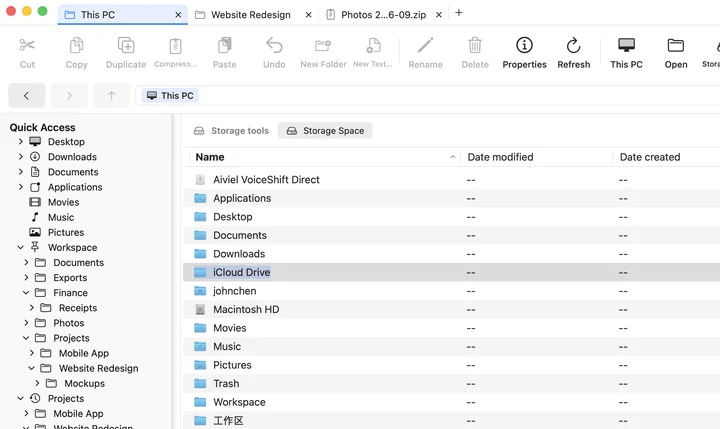
Keep a project, a download folder and a ZIP archive open side by side. Each tab remembers exactly where you were, so switching never loses your place.

Independent state
Location, Back and Forward history, selection, search, view mode, sorting and an open ZIP session are kept per tab.
Familiar keys
Ctrl+T opens a tab, Ctrl+W closes it, and Command+Shift+T brings back any of the last 10 closed tabs. Drag tabs to reorder them.
Picks up where you left off
Open folders and ZIP files in a new tab from any right-click menu, and restore your tabs after relaunching.
File operation center
Big copies and moves you can actually follow
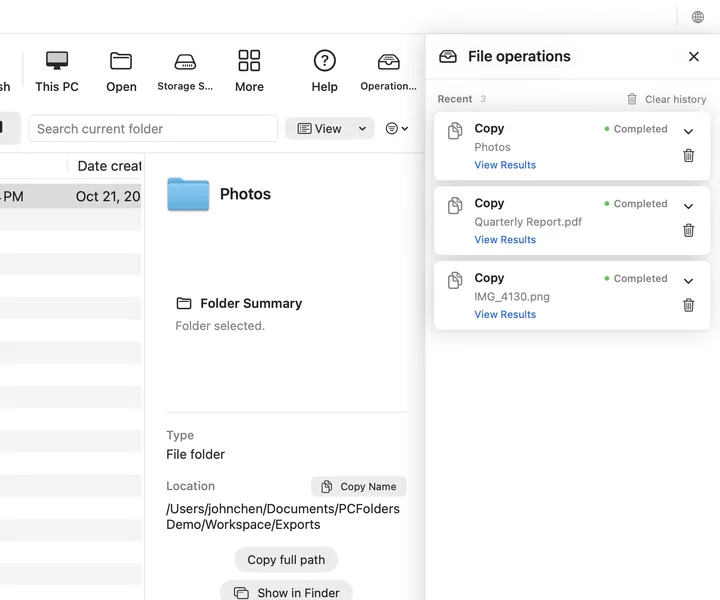
Large copies, moves and ZIP extractions run in one app-wide operation center, not inside a single tab. Keep browsing, switch tabs, or close the tab you started from — the work continues.
- Real progress. Current item, queue position, transfer rate and time remaining, based on bytes actually written.
- Clear conflict choices. Replace, Keep Both or Skip — once, or for all remaining conflicts.
- Safe cancel. Cancelling finishes the current safe step, removes only its own partial item and keeps everything already completed.
- History and results. Completed, failed and interrupted tasks stay in Recent for 7 days. View Results jumps straight to the copied files; Undo is offered when it is safe.
Right-click and shortcuts
Right-click does what you expect
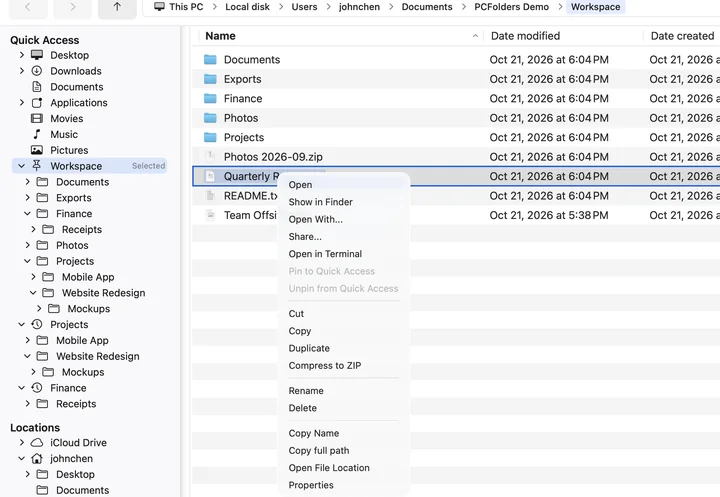
Cut, Copy, Paste, Duplicate, Compress to ZIP, Rename, Delete, Copy full path, Open in Terminal and Properties — all in one menu, all with PC shortcuts.
- Ctrl+X / Ctrl+V moves files — no hidden Option key trick
- F2 renames, Enter opens, fn+Delete moves to the Trash
- Alt+Enter shows Properties with size, dates, owner and permissions
- Ctrl+Shift+C copies full paths
Everything in plain sight
Built for people who like to see where files live
Folder tree
A persistent tree that follows where you are, with Quick Access, recent folders and pinned favorites.
Editable path bar
Click a breadcrumb or type a path. Paste Windows-style paths like C:\Users\you\Desktop and PCFolders opens the matching Mac folder.
This PC
Internal disks, external drives and the folders you granted, side by side with capacity.
ZIP like a folder
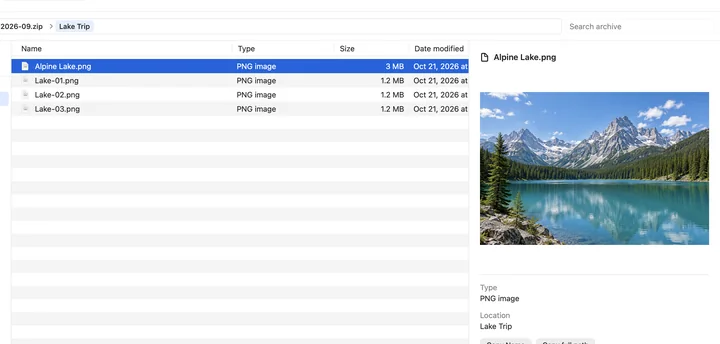
Open a ZIP, browse its folders, preview images and extract only what you need.
Storage Space
Scan a folder on demand to see folder and file sizes and find large files, then move them to the Trash with confirmation.
Five views and a viewer
Icons, list, details, tiles and content views, plus an image viewer with zoom, previous and next.
ZIP
Look inside ZIP files before you extract
Open an archive in its own tab, search by name, preview photos and documents, then Extract All or Extract Selected. Chinese file names from newer Macs and PCs display correctly.
This PC
Every drive and folder, one click away
PCFolders opens to a This PC view of your disks, mounted volumes and granted folders. Eject removable drives from the right-click menu.
Private by design
Your files stay on your Mac
No account. No tracking or analytics. PCFolders never uploads file names, paths, metadata or contents. It is sandboxed and only opens the locations macOS lets it open.
Read the privacy policy →Pricing
Try everything for 7 days. Buy once.
Download from the Mac App Store.
Full-feature trial. No automatic charge when it ends.
Lifetime access for US$9.99 in the US (local prices vary). No subscription.
Frequently asked questions
Does PCFolders replace Finder?
No. PCFolders runs alongside Finder. Files still open in their usual apps, and every item has Show in Finder when you need it. PCFolders simply gives you the folder tree, path bar, tabs and PC-style shortcuts many Windows users miss.
Can I cut and paste files on a Mac with PCFolders?
Yes. Select files, press Ctrl+X (or choose Cut from the right-click menu), open the destination and press Ctrl+V. The files are moved, stay selected after pasting, and the last operation can be undone with Ctrl+Z.
Do the PC shortcuts use Control or Command?
PC-style shortcuts use the Control key for Ctrl and the Option key for Alt, exactly as printed on a PC keyboard, so muscle memory carries over. Text fields keep normal Mac editing shortcuts, and Cmd+Delete also moves items to the Trash.
How much does PCFolders cost?
PCFolders is a free download with a 7-day full-feature trial. After that, lifetime access is a one-time in-app purchase (US$9.99 in the United States; local prices vary). There is no subscription, and the trial never charges automatically.
Which Macs are supported?
PCFolders requires macOS 14 Sonoma or later and is available on the Mac App Store.
Can PCFolders see all of my files? Is my data uploaded?
PCFolders is a sandboxed Mac App Store app. It opens standard locations and the folders you grant through the macOS folder picker. It needs no account, has no tracking, and never uploads file names, paths or contents.
Which languages does PCFolders support?
English, Simplified Chinese and Traditional Chinese. The app follows your macOS language, or you can switch instantly with the globe button at the right of the tab bar.
Is there an iPhone version?
PCFolders Mobile for iPhone is coming soon. This site will link to it once it is available on the App Store.
Guides
Moving from Windows to Mac?
Practical guides for the file tasks that feel different on a Mac — with the Finder way and the PCFolders way.
A Windows-style file explorer for Mac
What Finder does differently, and how to get the Explorer workflow back.
Read guide →How to cut and paste files on Mac
Option-Command-V in Finder, drag tricks, and true Ctrl+X / Ctrl+V.
Read guide →How to see and copy a file path on Mac
Path bar, Copy as Pathname, Go to Folder and an editable address bar.
Read guide →Less hunting. More handling.
Get the folder tree, tabs, path bar and PC shortcuts back on your Mac today.
Free download · 7-day full trial · One-time purchase, no subscription · macOS 14 or later