 PCFolders
 for Mac · Features
Everything PCFolders does
A complete list of what you get: navigation, tabs, file operations, the operation center, views, ZIP and storage tools.
Download on the Mac App Store
Free download · 7-day full trial · One-time purchase, no subscription · macOS 14 or later
Navigate
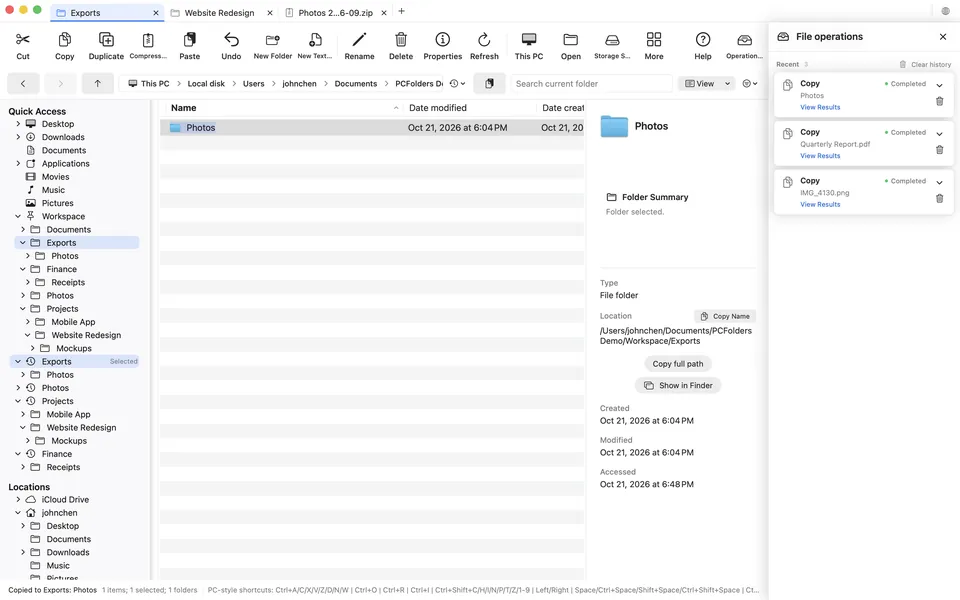
- Folder tree that expands to the current location, with Quick Access, recent folders and pinned favorites
- Editable path bar with clickable breadcrumbs (Ctrl+L, Alt+D or F4 to type a path)
- Understands Windows-style input: C:\Users\name\Desktop, %USERPROFILE%, shell:Downloads, quoted paths and file:// URLs
- Back, Forward and Up buttons with Alt+Left, Alt+Right and Alt+Up; the Delete (Backspace) key goes up one folder
- This PC view of disks, mounted volumes and granted folders
- Search the current folder with Ctrl+F or Ctrl+E
Tabs
- Each tab keeps its own location, history, selection, search, view mode, sorting and ZIP session
- Ctrl+T new tab, Ctrl+W close tab, Command+Shift+T reopens one of the last 10 closed tabs
- Open in New Tab from folders, sidebar items, search results and ZIP files; drag tabs to reorder
- Inactive tabs keep their state without slowing down the tab you are using
File operations
- Cut, Copy and Paste with Ctrl+X, Ctrl+C and Ctrl+V; pasted items stay selected
- Duplicate (Ctrl+D), Rename (F2), New Folder (Ctrl+Shift+N), New Text Document (Ctrl+Shift+T)
- fn+Delete (Forward Delete) or Cmd+Delete moves to the Trash; Ctrl+Z undoes the last supported operation
- Conflict choices: Replace, Keep Both, Skip, or apply to all
- Compress to ZIP, Copy full path (Ctrl+Shift+C), Open in Terminal, Share, Properties (Alt+Enter)
File operation center
- One app-wide queue for large copies, moves and ZIP extractions — independent of the tab that started them
- Progress from bytes actually written, with transfer rate, queue position and time remaining
- Cooperative cancel that keeps completed results and cleans up only its own partial item
- Recent history for up to 50 tasks or 7 days, with View Results, Show in Finder, Share and safe Undo
- Interrupted tasks are marked after a crash or forced quit and never restart on their own
Views and preview
- Icons, list, details, tiles and content views (Ctrl+Shift+1 to 9)
- Details columns: Name, Date modified, Date created, Date accessed, Type, Attributes and Size
- Preview pane for images, PDFs, audio and video; image viewer with zoom, fit, previous and next
- Show or hide file name extensions and hidden items
ZIP and storage
- Open ZIP archives like folders, search, preview and extract all or selected items
- Correct Chinese file names in ZIPs made on newer Macs and PCs
- Storage Space: on-demand folder sizes, expandable tree and a large-file finder
Requirements
- macOS 14 Sonoma or later
- English, Simplified Chinese and Traditional Chinese interface, switchable in the app
- Free download with a 7-day full trial; one-time purchase for lifetime access
Try it free for 7 days
Download on the Mac App Store
Free download · 7-day full trial · One-time purchase, no subscription · macOS 14 or later